Yes, a proxy server can hide your IP address from the websites and online services you visit. Instead of connecting directly to a website, your internet traffic passes through the proxy server. The website sees the proxy server’s IP address rather than the IP address assigned to your device or network.
However, a proxy does not make you completely anonymous. Your internet service provider may still see that you are connecting to a proxy, and the proxy provider may be able to view or record your activity. The amount of privacy you receive depends on the type of proxy you use and how it is configured.
How Does a Proxy Server Hide Your IP Address?
Every device connected to the internet uses an IP address to send and receive information. This address can reveal general information about your connection, including your approximate geographic location and internet service provider.
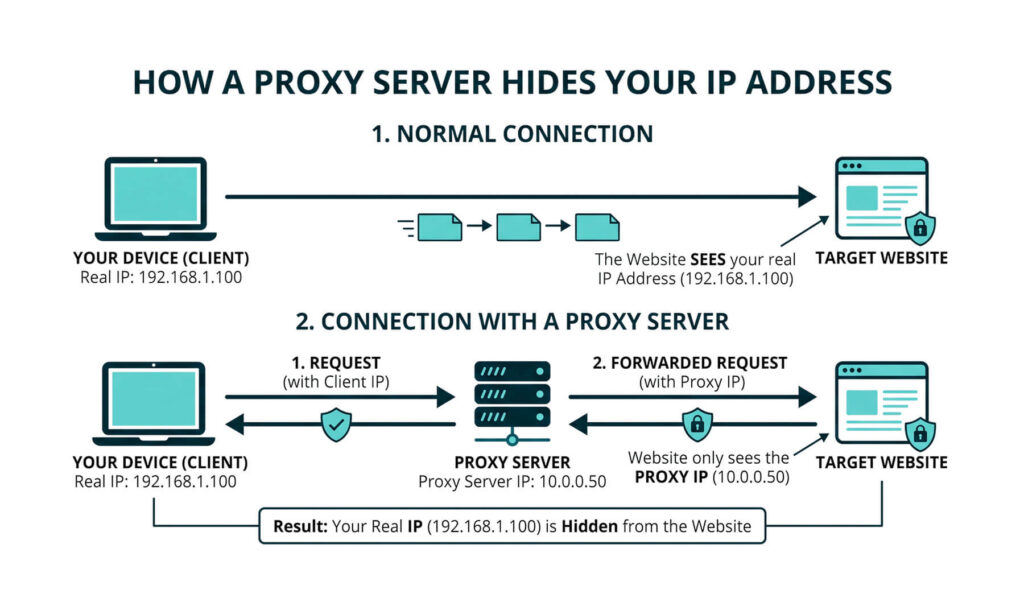
Normally, your device connects directly to a website. The website receives your request and records your public IP address.
A proxy server acts as an intermediary between your device and the website:
- Your device sends a request to the proxy server.
- The proxy forwards the request to the website.
- The website sends its response back to the proxy.
- The proxy delivers the response to your device.
Because the request reaches the website through the proxy, the website generally sees the proxy server’s IP address instead of yours.
What Information Does a Proxy Hide?
A properly configured proxy can prevent websites from seeing your original public IP address. This may also conceal information associated with that IP address, such as:
- Your approximate geographic location
- Your internet service provider
- Your business, school, or network
- Whether multiple visits originated from the same IP address
However, a proxy primarily changes the network address visible to the destination. It does not automatically hide information about the device, browser, or application making the request.
Websites and online services may still collect device-level information such as:
- Browser type and version
- Operating system
- Device type
- Screen size and resolution
- Language settings
- Time zone
- Installed fonts
- Browser extensions
- Hardware and graphics characteristics
- Advertising or device identifiers used by mobile applications
These details can contribute to browser or device fingerprinting. When enough characteristics are combined, a website may be able to recognize the same device across multiple visits even when its visible IP address changes.
A proxy also does not hide browser cookies, account logins, tracking pixels, or information you voluntarily submit. For example, using a proxy will not conceal your identity if you sign in to an account connected to your real name.
Poorly configured proxies may also allow IP information to leak through browser features, application traffic, DNS requests, or connections that bypass the proxy entirely. This is why hiding an IP address should not be treated as the same thing as hiding a device or becoming anonymous online.
Can Your Internet Provider See You Using a Proxy?
Your internet service provider can usually see that your device is connecting to a proxy server. Whether it can see the specific websites you visit depends on the proxy configuration, encryption method, and protocols being used.
A basic web proxy may only hide your IP address from the destination website. It may not encrypt all traffic traveling between your device and the proxy.
This means a proxy should not automatically be treated as a complete privacy or security solution.
Can the Proxy Provider See Your Activity?
The proxy provider may be able to see information passing through its servers. Depending on the service, this could include:
- Your real IP address
- The websites you access
- Connection times
- Data transferred through the proxy
- Unencrypted information submitted to websites
Some proxy services maintain connection logs, while others claim to limit or avoid logging. Free proxy services can be particularly risky because it may not be clear who operates them, how they make money, or what they do with user data.
Using a proxy shifts a degree of trust away from your internet provider and toward the proxy provider. It does not eliminate the need for trust.
Are All Proxy Servers Equally Private?
Different proxies offer different levels of privacy.
Transparent Proxies
A transparent proxy may identify itself as a proxy and pass your original IP address to the destination website. These proxies are commonly used by businesses, schools, libraries, and public networks to filter or monitor traffic.
A transparent proxy generally does not hide your IP address.
Anonymous Proxies
An anonymous proxy hides your original IP address but may tell the website that the request came through a proxy server.
This provides more privacy than a transparent proxy, although websites may still detect and restrict the connection.
High-Anonymity Proxies
A high-anonymity proxy attempts to hide both your original IP address and the fact that you are using a proxy.
These proxies may provide greater privacy from destination websites, but they still do not prevent tracking through cookies, accounts, or browser fingerprinting.
Residential Proxies
Residential proxies route traffic through IP addresses associated with residential internet connections. Websites may view the traffic as coming from an ordinary household connection rather than a data center.
These proxies are often used for website testing, market research, localized search results, and other business applications.
Data Center Proxies
Data center proxies use IP addresses supplied by hosting companies or cloud infrastructure providers. They are often fast and affordable but can be easier for websites to identify as proxy traffic.
Does a Proxy Encrypt Your Internet Traffic?
Not necessarily.
Hiding an IP address and encrypting internet traffic are separate functions. A proxy may replace your visible IP address without encrypting the information moving between your device and the proxy server.
HTTPS websites encrypt the connection between the browser and the website, but the exact protection depends on how the proxy handles that connection.
A proxy should not be assumed to protect sensitive information unless the service specifically provides secure, encrypted connections.
What Is a VPN?
A virtual private network, or VPN, is a service that creates an encrypted connection between your device and a remote VPN server. Your internet traffic travels through this protected connection before reaching websites, applications, and other online services.
Like a proxy, a VPN replaces the IP address visible to the websites you visit. Those websites generally see the IP address of the VPN server rather than the public IP address assigned to your home, office, or mobile connection.
The main difference is that a VPN usually protects more of your internet traffic and encrypts the connection between your device and the VPN server.
How Does a VPN Work?
When you connect to a VPN, the VPN application creates an encrypted tunnel between your device and a server operated by the VPN provider.
The process generally works as follows:
- Your device connects to the VPN server.
- The VPN encrypts internet traffic leaving your device.
- Your traffic passes through the encrypted VPN connection.
- The VPN server sends your requests to websites and online services.
- Those websites respond to the VPN server.
- The VPN server encrypts the response and sends it back to your device.
Because websites receive requests from the VPN server, they generally see the VPN server’s IP address instead of your original IP address.
Your internet provider can usually see that you are connected to a VPN, but it generally cannot see the contents of the encrypted traffic traveling through the VPN tunnel. It may still see when you connected, how long the connection lasted, and how much data was transferred.
Does a VPN Hide Your IP Address?
Yes. A properly configured VPN hides your public IP address from the websites, applications, and online services you access through the VPN connection.
However, a VPN does not make you completely anonymous. Websites may still identify you through account logins, cookies, payment information, browser fingerprinting, location permissions, and other tracking methods.
The VPN provider may also be able to see your original IP address and information about your connection. Choosing a trustworthy provider with clear privacy and logging policies is therefore important.
Proxy Server vs. VPN
Proxy servers and VPNs can both hide your original IP address, but they operate differently.
A proxy typically routes traffic from a specific browser, application, or protocol through an intermediary server. A VPN usually routes and encrypts most or all internet traffic leaving the device.
Traffic Coverage
A proxy often works at the application level. For example, you might configure your browser to use a proxy while email software, cloud applications, and other programs continue connecting directly to the internet.
A VPN generally operates at the device or operating-system level. Once connected, traffic from browsers, applications, background services, and other programs usually passes through the VPN.
Some VPNs also offer split tunneling, which allows selected applications to use the VPN while others connect directly to the internet.
Encryption
A proxy does not automatically encrypt traffic between your device and the proxy server. Its main purpose may be to forward requests and replace the IP address seen by the destination.
A VPN encrypts traffic between your device and the VPN server. This can help protect information from interception by people using the same network, local network administrators, or internet providers.
Encryption is especially useful when connecting through public Wi-Fi in airports, hotels, restaurants, and other shared locations.
IP Address Protection
Both tools can replace the IP address visible to a website.
With a proxy, only traffic configured to use that proxy receives the replacement IP address. Other applications may continue exposing your normal public IP address.
With a VPN, most device traffic typically uses the VPN server’s IP address unless split tunneling, connection failures, or configuration problems cause certain traffic to bypass the VPN.
Performance
A proxy can sometimes be faster because it may process less traffic and may not provide strong encryption. This makes proxies useful for tasks that require a different visible IP address but do not require device-wide protection.
A VPN may reduce connection speed because traffic must be encrypted and routed through a remote server. The effect depends on the VPN provider, server location, network congestion, encryption protocol, and quality of the user’s internet connection.
Setup and Use
Proxies may need to be configured individually within each browser or application. Some services also provide browser-based proxies that only work for websites opened through a particular page.
VPNs generally require an application or built-in operating-system configuration. Once the connection is active, the VPN can protect traffic from multiple applications without requiring each one to be configured separately.
Privacy and Trust
Both tools require you to trust the company operating the intermediary server.
A proxy provider may be able to see your original IP address, browsing destinations, and any unencrypted data passing through its systems.
A VPN provider may also be able to see connection information and potentially observe traffic leaving its servers. Encryption protects the connection between your device and the VPN server, but it does not remove the VPN provider from the process.
A free proxy or VPN should not automatically be considered private. Some free services may collect user data, maintain detailed logs, inject advertising, or make money through tracking and data-sharing practices.
Proxy Server vs. VPN Comparison
| Feature | Proxy Server | VPN |
| Hides your IP address | Yes, for configured traffic | Yes, for traffic using the VPN |
| Encrypts traffic | Not always | Generally yes |
| Covers the entire device | Usually no | Usually yes |
| Requires application-level setup | Often | Usually no |
| Protects activity on public Wi-Fi | Limited | More comprehensive |
| May reduce connection speed | Sometimes | Sometimes |
| Requires trust in the provider | Yes | Yes |
| Makes you completely anonymous | No | No |
Should You Use a Proxy or a VPN?
The better option depends on what you are trying to accomplish.
A proxy may be appropriate when you need to:
- Change the IP address seen by one browser or application
- Test how a website appears from another region
- Manage or filter internet access on a business network
- Route a specific type of traffic through another server
- Perform authorized website testing or market research
A VPN may be more appropriate when you need to:
- Encrypt internet traffic on public Wi-Fi
- Hide your IP address across most applications
- Secure a remote connection to a company network
- Protect data traveling between a device and a remote server
- Apply broader privacy protection across an entire device
Businesses frequently use VPNs to give remote employees secure access to internal systems, shared files, business applications, and network resources. Consumer VPNs are more commonly used to protect personal browsing traffic and replace the user’s visible IP address.
Can You Use a Proxy and VPN Together?
It is technically possible to use a proxy and VPN at the same time, but most users do not need both.
Traffic may first pass through the VPN and then through the proxy, creating multiple intermediary connections. This can make the setup more complicated, reduce connection speeds, and make troubleshooting more difficult.
Using both tools also does not guarantee anonymity. The VPN provider, proxy operator, destination website, browser, and online accounts may still collect information that can identify or track the user.
For most people, a reputable VPN provides more complete protection than a basic proxy because it combines IP address masking with encrypted, device-wide traffic routing.
Can Websites Still Track You Through a Proxy?
Yes. An IP address is only one of many signals websites can use to identify or track visitors.
A website may still recognize you through:
- Cookies stored in your browser
- Advertising identifiers
- Account logins
- Browser settings
- Device characteristics
- Screen size and operating system
- Tracking pixels
- Browser fingerprinting
For stronger privacy, users must consider more than their IP address. Browser settings, account activity, cookie management, and the reliability of the proxy provider all affect how easily online activity can be connected to a specific person.
When Should You Use a Proxy Server?
Proxy servers can be useful for legitimate personal and business purposes, including:
- Testing how a website appears in different locations
- Managing network access
- Filtering unwanted websites
- Conducting market or pricing research
- Separating specific applications from a primary IP address
- Controlling employee internet access
- Improving performance through cached content
Businesses may also use proxies to enforce security policies, inspect traffic, limit access to risky websites, and manage how employees connect to external services.
Does a Proxy Server Make You Anonymous?
A proxy server can hide your IP address from the websites you visit, but it does not make you completely anonymous.
Your internet provider may still know you are connecting to a proxy. The proxy provider may be able to monitor your activity. Websites may also identify you through cookies, accounts, browser fingerprinting, and other tracking technologies.
A proxy is best understood as an intermediary that changes the IP address visible to a destination website. It can improve privacy in certain situations, but it should not be treated as a complete anonymity or cybersecurity solution.
Frequently Asked Questions
Does a Free Proxy Hide Your IP Address?
Some free proxies hide your original IP address from websites, but their privacy and security practices can vary significantly. A free provider may log your activity, display advertisements, inject tracking technology, or operate without strong security controls.
Can Someone Find Your Real IP Address Through a Proxy?
It may be possible if the proxy is improperly configured, leaks connection information, passes your original IP address through headers, or stops working while your device continues connecting directly. Browser technologies and malicious scripts may also expose network information in certain situations.
Does a Proxy Hide Your IP Address From Google?
A proxy can replace the IP address Google sees during a connection. However, Google may still associate your activity with you through your account, cookies, browser information, location settings, or previous activity.
Does Incognito Mode Hide Your IP Address?
No. Incognito or private browsing mode primarily limits the information stored locally after the browsing session. Websites, network administrators, and internet providers can still see the IP address used for the connection.
Is Changing Your IP Address Illegal?
Changing or masking an IP address is generally legal in the United States. However, using a proxy does not make illegal activity lawful or allow someone to bypass applicable contracts, access restrictions, or regulations.